

Toonapp: Cartoon Photo Editor
Lyrebird Studio
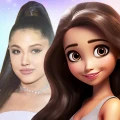
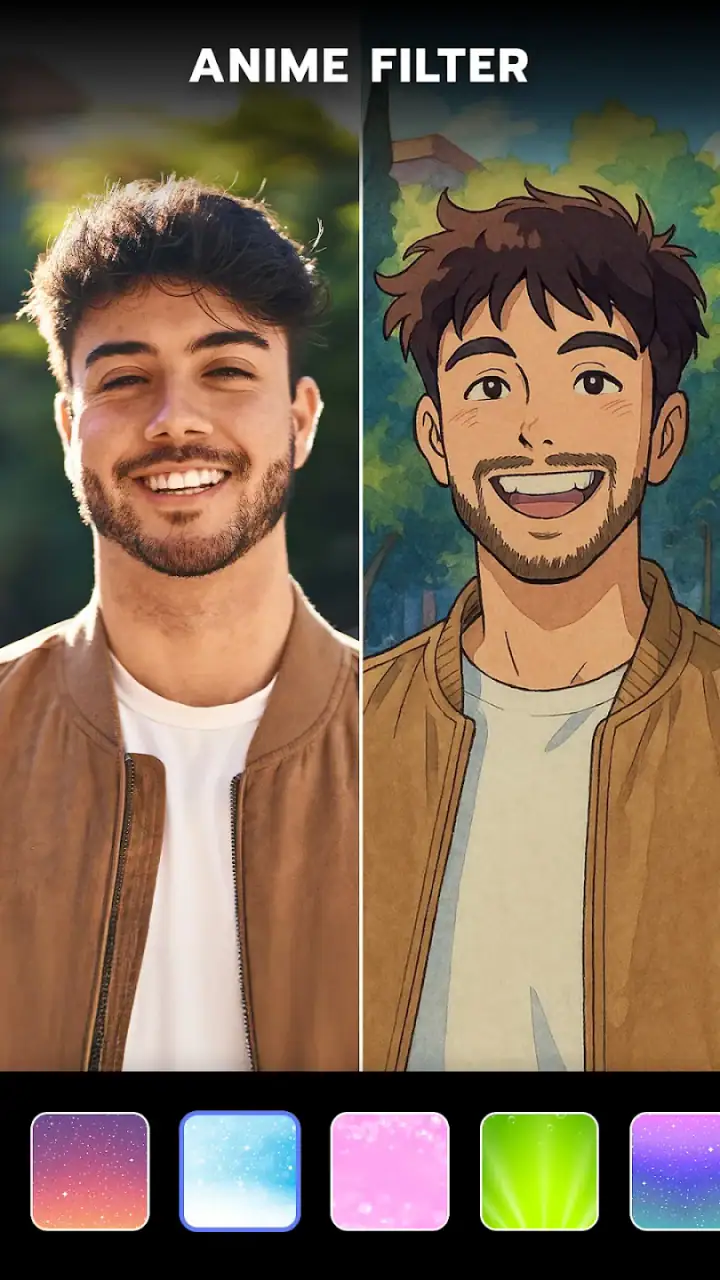
I opened Toonapp: Cartoon Photo Editor expecting a quick novelty filter, but it felt more useful than that in everyday photo work. The app turns ordinary portraits into cartoon-style images, with caricature and anime-inspired treatments that can change the mood of a picture in seconds. I can see why it has become such a familiar name in mobile photography: it is simple to approach, visually immediate, and aimed at people who want a finished-looking result without learning a full editing suite.
That simplicity is also the key to understanding it. This is not a replacement for a professional retouching app, and it is not designed around careful manual editing. It is an effect-driven tool from Lyrebird Studio, available free of charge for an Everyone-rated audience. In my experience, its best use is turning a good source portrait into something playful for a profile image, message, post, invitation, or personal collection. The result depends heavily on the original photo, so the app rewards a little preparation rather than completely rescuing poor images.
What Toonapp does well when trust matters
The app belongs squarely in the photography category, but its appeal is closer to creative transformation than traditional correction. I can choose a portrait, apply a cartoon treatment, and compare the result with the original idea in mind: does the face still look like me, does the style suit the expression, and is the background helping or distracting? Those questions matter more here than sliders for exposure or color temperature.
Related News
How Picsart AI is Transforming Mobile Photo Editing
Toonapp: Transform Your Photos into Cartoon Art
Why UpFoto - AI Photo Enhancer is Revolutionizing Mobile Photography
The scale of its audience is notable. Toonapp has passed over 100 million installs and holds a 4.6 average from around 2.5 million ratings, with roughly 12 thousand written reviews. Those figures do not guarantee that every result will suit every face, but they do show that the basic concept has broad appeal. I would still treat popularity as context rather than proof of quality, especially when an app works with personal photographs.
My trust in a photography app starts with visible choices rather than reputation. When I use a tool like this, I want to know which image I am selecting, when an edit is being generated, and whether I am being pushed toward an optional purchase. Toonapp’s design is easy to understand at the basic level: the creative action is prominent, and the purpose of the app is clear. That helps reduce the feeling that I am navigating an unrelated maze before reaching the editor.
Latest News

Uber Eats Under Pressure: What Happens When Delivery Goes Wrong

How QR & Barcode Scanner Adapts to Android and iOS Innovations

Why Waze Navigation & Live Traffic Is Your Essential Travel Companion

CapCut Mastery: Unleash Hidden Features for Pro-Level Editing

How OS Updates Enhance Roblox Adventures

Teacher Simulator: Exam Time Turns Quick Classroom Judgments into a Repetitive Loop
At the same time, a clear interface should not be confused with a complete privacy explanation. A portrait can be highly personal even when it contains no written information. Before importing a family photo, a child’s picture, or an image taken for work, I would read the app’s current privacy information and review the choices shown during use. That is a sensible habit for any service that transforms images, and it is especially important when the editing process may involve online image processing.
The version I reviewed is 3.1.58 and it runs on Android 7.0 or later. That makes it accessible to many older devices, although compatibility alone does not tell me how smoothly every effect will run. On a less powerful phone, I would avoid opening several large images at once and would give the app time to finish each transformation instead of repeatedly tapping the same control.
Controls I would check before editing a personal photo
One practical strength is that the app gives me a direct creative decision: I select the image and decide whether the cartoon treatment is appropriate. That sounds basic, but it matters when the gallery contains screenshots, private documents, or pictures of other people. I would make the selection deliberately instead of granting myself a habit of choosing the newest image automatically.
Gallery
I also pay attention to the point at which an edit becomes a saved or shared image. Saving locally and sharing to another service are different actions from my perspective. I prefer to review the finished picture first, check the crop, and only then decide whether it belongs in a public post. A cartoon effect can make a face look less formal, but it does not remove the responsibility of asking whether everyone pictured is comfortable with the result.
The free entry point is useful for testing the style before spending anything. In-app purchases range from $2.00 to $69.99 per item, so I would not assume that every visible effect or workflow is included at no cost. The sensible approach is to try the free path, identify what is actually needed, and read the purchase screen carefully before confirming. A large one-time-looking amount can be easy to misunderstand when someone is moving quickly through a creative app.
This is also where user agency becomes important. I want to know whether I can simply leave an effect screen, cancel a purchase, or choose another style without losing the original photo. I would keep the unedited picture in my gallery and treat Toonapp’s output as a copy. That small workflow protects me from making a temporary experiment feel permanent.
Where a careful user should slow down
The most sensitive moment is the image import itself. A selfie may reveal a face, location clues, uniforms, children, or other people in the background. I would crop or replace the image before editing when those details are unnecessary. For a casual cartoon avatar, there is no reason to include a visible address, workplace badge, or private conversation behind the subject.
Another sensitive moment comes after generation, when the result looks entertaining enough to share immediately. I have found that stylized images invite fast posting because they feel less serious than the original. That can be misleading. A transformed portrait is still a portrait, and the app’s playful output does not automatically make public sharing harmless. I would inspect the background, facial details, and any recognizable bystanders before exporting.
I would use extra care with photographs of children. The Everyone content rating describes the intended audience for the app, not permission to process or publish every image involving a child. For a family project, I would select a simple, tightly cropped picture, check the current privacy information, and avoid sharing the result publicly unless the relevant adults agree.
Account and purchase choices deserve similar attention. If the app presents an option to subscribe, restore a purchase, or continue with a premium feature, I would pause long enough to understand which button does what. I would also check the account settings and the operating system’s purchase controls if I were letting someone else use my phone. These steps are not exciting, but they are more valuable than chasing one extra filter.
I would not use Toonapp as my only place to keep important originals. Even when an edited result is attractive, I prefer to retain the source image in my normal photo library and back it up through the service I already trust. That separates creative experimentation from archiving and gives me control if I later decide that a different editor produces a better result.
Small workflows that improve the final image
The first useful trick is to prepare the portrait before opening the app. I choose a face that is reasonably well lit, not hidden by a hand or heavy shadow, and framed with enough space around the head. Cartoon filters exaggerate recognizable features, so a slightly clearer source often produces a more convincing result than a dramatic but poorly exposed selfie.
My second tip is to make several crops of the same original before committing to a style. A close face crop can work well for an avatar, while a wider crop may preserve hair, clothing, or a meaningful background. The best version is not always the most detailed one; it is the one that keeps the subject readable after the effect changes the visual texture.
A third insight is to judge the output at the size where it will actually be used. An image that looks impressive full-screen may become muddy as a small profile picture. Conversely, a treatment with exaggerated lines can work perfectly in a tiny icon. I would preview the result at message or profile size before spending time refining a version that will be seen only as a small square.
I also avoid editing a group photo first. Face-based cartoon effects can produce uneven results when people are standing at different distances or looking in different directions. I get more predictable control from an individual portrait, then decide whether separate stylized images make more sense than forcing one effect across a whole group.
For a realistic everyday scenario, imagine that I need a friendly image for a community chat but do not want to use a formal headshot. I would pick a well-lit portrait, crop out unrelated background details, test a few cartoon looks, and save the most recognizable version. Before sharing it, I would check that the image does not reveal a private setting and confirm that the final crop still looks clear in a small circle. That takes less effort than building an avatar manually in a full editor.
How it compares with ordinary photography alternatives
Compared with a standard photo editor, Toonapp is faster but less precise. A conventional editor is better when I need to remove a blemish carefully, correct a difficult exposure, straighten a horizon, or control individual colors. Toonapp is better when the goal is a visible change of identity and mood rather than a faithful correction.
Compared with a collage maker, it focuses more directly on the subject’s appearance. A collage app gives me layout, text, borders, and multiple-image composition; Toonapp’s appeal is the transformation of one portrait. If I am making a birthday card with several photos and typography, I would probably edit the images elsewhere and use Toonapp only for a selected character-like portrait.
Compared with manual digital illustration, the advantage is speed. I do not need drawing skills to get a stylized result. The trade-off is control: I cannot expect the same deliberate line work, expression adjustment, or likeness management that an artist could provide. For a personal avatar, that compromise is reasonable. For a commissioned illustration or a brand image that must match a strict visual identity, I would choose a more controllable tool or a human designer.
Compared with camera apps that apply effects live, Toonapp makes more sense when I already have a photograph worth transforming. A live camera filter is convenient for experimenting while framing a shot, but a dedicated photo editor gives me time to choose the source and review the final image. I would use the camera approach for spontaneous fun and Toonapp for a portrait I intend to keep or share.
Who will enjoy it, and who should skip it
I recommend Toonapp to people who want quick social images, playful profile pictures, personalized greetings, or a low-effort way to make a familiar portrait feel new. It is also suitable for someone who finds traditional editing panels intimidating. The app’s appeal is strongest when the desired outcome can be described simply: “make this person look like a cartoon.”
I would be more cautious about recommending it to someone who needs exact retouching, professional color management, detailed background replacement, or repeatable control across a large batch of images. The same automated style that makes the app approachable can feel limiting when the face, lighting, or composition needs careful correction.
I would also skip it for sensitive images unless I had reviewed the current permissions, privacy explanations, and available account controls first. That includes identity documents, medical photographs, confidential workplace images, and portraits of people who have not agreed to the edit. The fact that an image is transformed does not make the original subject anonymous.
The app is free to start, but the purchase range means budget-conscious users should decide in advance what “free” means for them. If I only want to test a couple of styles, I would avoid tapping premium-looking options repeatedly and would inspect any checkout wording. Someone who dislikes in-app purchase prompts may prefer a simpler editor with a clearly limited one-time toolset.
My cautious verdict after using it
Toonapp: Cartoon Photo Editor succeeds because it removes the technical barrier between a normal portrait and a playful illustration. I can get a shareable result quickly, and the concept is specific enough that I rarely wonder what the app is meant to do. Its large install base and strong average rating support the view that the format works for many people, while the free starting point makes it easy to judge personally.
My recommendation comes with boundaries. I would preserve the original, choose images carefully, review privacy and permission choices, and treat every purchase screen as something to read rather than dismiss. I would also accept that some faces and photos will look better in a conventional editor, especially when accuracy matters more than style.
The best way to use Toonapp is as a controlled creative step, not as an automatic destination for every photograph. Used that way, it is an enjoyable photography app for avatars and casual sharing. If you want precise editing, sensitive-image handling without careful review, or guaranteed consistency from one portrait to the next, I would look elsewhere. For quick cartoon experimentation with clear personal control, however, it is an easy app to recommend to a friend.
FAQs for Toonapp: Cartoon Photo Editor
What is ToonApp: Cartoon Photo Editor?
ToonApp: Cartoon Photo Editor is a creative app that transforms your photos into cartoon-style images. With a variety of filters and effects, it allows users to easily convert their selfies and portraits into artistic, cartoon-like visuals. The app is popular for its user-friendly interface and high-quality results.
Is ToonApp free to use?
ToonApp offers a free version with basic features, allowing users to experiment with a limited selection of cartoon filters. However, for access to a wider range of tools, effects, and ad-free experience, users may opt for the premium subscription. This ensures a more comprehensive editing experience.
How does ToonApp maintain the quality of edited images?
ToonApp uses advanced AI technology to enhance photos without compromising quality. The app applies sophisticated algorithms to ensure that the cartoon effects are sharp and vibrant, preserving the original clarity of the images. This makes it ideal for users looking to maintain high-resolution outputs.
Can I share my creations from ToonApp directly on social media?
Yes, ToonApp allows easy sharing of your creations directly to popular social media platforms like Instagram, Facebook, and Twitter. The app is designed with seamless integration features, enabling you to post your cartoonized photos with just a few taps, making sharing quick and effortless.
Is ToonApp suitable for professional use?
While ToonApp is primarily designed for casual users looking to have fun with their photos, its advanced features and high-quality output make it suitable for semi-professional use. Photographers and digital artists can use it to add unique effects to their portfolio, although it may not replace more comprehensive editing software.
Pros
- User-friendly interface
- easy to navigate.
- Wide range of cartoon styles available.
- Quick processing with minimal lag.
- Supports high-resolution photo exports.
- Regular updates with new features.
Cons
- Limited free features
- premium required.
- Occasional ads interrupt editing flow.
- Some styles lack customization options.
- Requires stable internet connection.
- May drain battery on older devices.


